
The event app for in-person conferences · Everything included, not add-ons
- Multi-track agenda
- Push notifications
- Attendee meetings
- Moderated chat
- Live Q&A and polls on the big screen
- Venue map with GPS
- Badge printing
- Exhibitor lead capture
- Works offline
Your whole conference,
in one app.
iPhone, Android and the web. Nothing to rent, nothing bolted on.
A trial event is free for up to 5 people. No card, no call booked to see it.
One app. The whole show.
The six jobs that decide whether an event app was worth buying.
Upload once
The schedule spreadsheet you already maintain becomes a live, filterable agenda. Three required columns. Roll back any upload.
No hidden clashes
Clashing sessions are flagged on both cards instead of quietly overlapping, and open gaps show as free time.
They actually meet
Attendees book each other — one‑to‑one or in groups — with a finder that compares everyone’s real schedules and offers only the open windows.
Badges by 07:40
A Registrar role prints name badges at the desk on Zebra, TSC and Eltron label printers, without handing over the rest of your admin.
Sponsors get a number
Booth staff scan QR badges with the phones in their pockets. No rented scanners, and a lead count that sells next year’s booth.
The wifi can die
Schedule, map, directory and lead scans keep working in the basement ballroom, and sync when signal returns.
All of it inside one app on iPhone, Android and the web — and everything below is the detail behind these six.
Everything included, on one screen.
The list most coordinators are actually scanning for. Exhibitor lead retrieval is the one paid add-on; the rest is simply in the product.
- Multi-day agenda with tracks, filters and favourites
- Overlapping sessions flagged, free gaps shown
- Personal “My Agenda” per attendee
- Bulk schedule upload by TSV or CSV, with batch rollback
- Bulk attendee import and export, keyed on email
- Custom profile fields you define, in seven field types
- Searchable attendee directory, plus a speaker page built from sessions
- One-to-one and group meetings with a mutual-time finder
- Direct messages, private groups and public rooms
- Chat moderation queue with a Moderator role
- Files up to 50 MB, photos and voice notes in chat
- Anonymous Q&A with upvoting and moderation
- Live polls with a full-screen presenter view
- Zoomable venue map with pins, plus optional GPS positioning
- Sponsor and exhibitor directory with tiers
- Self-service listing edits for exhibitors, no login
- Name badge printing with a Registrar role (label printer required)
- Announcements with start and end times
- Push targeted by role or named group, scheduled or now
- Google, Apple and Outlook calendar subscriptions
- Offline access to the schedule, venue map and directories
- Usage analytics, with CSV export
- Free self-signup by event code or invite link
- Exhibitor lead retrieval — paid add-on
Import straight from the spreadsheet that already has all your data.
Your programme already lives in a spreadsheet somebody keeps emailing around. Import it
as TSV or CSV — no retyping, no rebuilding it session by session. Headers are
forgiving about case and spacing, so Session Name and session_name both land.
titlesession datestart timeend timelocationspeakerIDsdescriptiontrackEvery upload is a batch you can roll back
An upload replaces the whole visible schedule, so the file has to be complete. In return you get a batch history — when the programme changes at 4pm the day before, you re-upload, and rolling that batch back brings the previous schedule straight to the front.
Rows that fail come back and tell you why
Bad rows land in a Failed Rows table with the row number and the reason, rather than failing the whole import. Export the current schedule, fix it in a spreadsheet, upload it again.
Attendees import the same way
First Name, Last Name and email are required, and
email is the identity key — a matching address updates that person, a new one
creates them. Nobody gets emailed by an import.
Ask for exactly what you need
Define your own profile fields — dietary needs, chapter, table number — from a sheet, in seven field types including dropdowns and checklists. You decide per field whether attendees see it or only staff do.
Doors open, and the queue at the registration desk moves.
Getting people in
Attendees join with a six-character event code or a signup link that carries the code for them — whichever suits the room. Signing in defaults to a magic link by email that lasts 30 minutes, so nobody is resetting a password at the desk. US and Canadian numbers already on a profile can get a texted code instead.
Printing the badges
A Registrar role prints name badges from the People page without giving that volunteer the rest of your admin. A small free print server runs on the registration desk’s own Windows machine and drives ZPL, TSPL and EPL label printers — Zebra, TSC, Phomemo, older Eltron — auto-detected from the printer name, on 2″×1″ stock by default. Leave that window open all day.
Worth knowing before you plan around it: Eventable never sells tickets to your attendees or takes their money. Registration revenue happens in whatever you already use; Eventable handles the free self-signup that puts people in the app.
The part attendees actually touch.
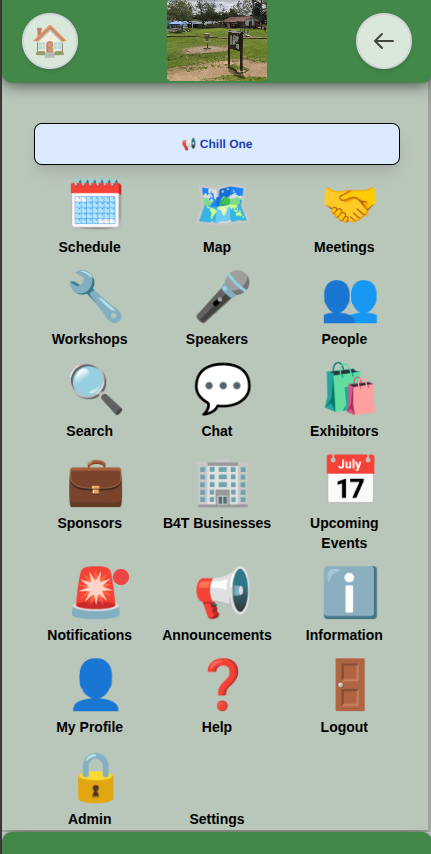
An event app earns its place in the four seconds someone spends on it between sessions. All of this sits one tap from the home screen — and you choose which icons appear, what they’re called and what order they sit in.
An agenda that admits when it collides
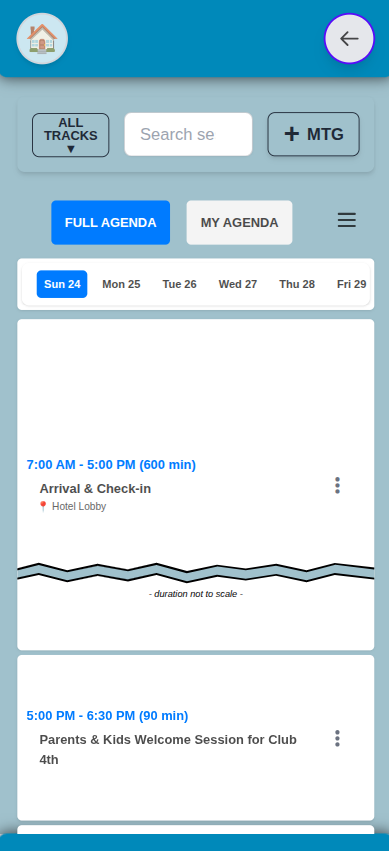
Tracks, filters and favourites — and clashes shown rather than hidden, either as an Overlapping Event flag on both cards or folded into one expandable group. Gaps over five minutes show as (Free Time).
Meetings, with a finder that reads real agendas
Five minutes to eight hours or a custom length, up to three days either side of the event. Find mutual time compares the programme against every participant’s confirmed meetings, server-side, and offers back only the windows open for all of them.
Chat you can actually moderate
Direct messages, private groups and public # rooms, with replies, reactions,
voice notes and files up to 50 MB. Switch moderation on and every attendee post in a
public room waits for approval before anyone else sees it — your own staff post
straight through, and a Moderator role gets that queue and nothing else.
Q&A that’s anonymous even to the speaker
Anonymous to moderators and the person on stage, which is what gets the real questions asked. Upvoting sorts them, and a full-screen presenter view puts the question being answered and the top five by votes up on the projector.
A floor plan that knows where you are
Create your rooms as Places and drag a pin onto each, and a session’s location opens the map centred on it. Calibrate against a few GPS points and attendees get a blue dot in the phone app — computed on their device and sent nowhere, so it locates them to themselves and nobody else.
Push that isn’t just a megaphone
Target everyone, a role, or a named group. Save templates, schedule the send, or nudge only the people whose profile is still missing a field — with a live count of exactly how many that is.
Paid add-on, per event
Your exhibitors renew when they can count what they got.
Lead retrieval is the number that ends the renewal conversation. Attendees show a QR badge from the app on their own phone, and booth staff scan it with the phone in their pocket — no rented scanners, no hardware to ship back.
Scan, rate, next
The scan fills the contact card, one tap marks the lead Hot, Warm or Cold, and Save & scan next drops back to the camera. Up to ten qualifying questions, set up before the show. Re-scanning someone reopens their card instead of duplicating it.
The badge works with no signal at all
The QR carries the contact details itself, so a scan needs no lookup and no bars of reception. Scans queue on the device with a pending count and upload themselves when the hall’s wifi returns.
One list per company, exported Monday
Every staffer’s scans land in one shared list showing who scanned whom and when. Export to CSV or TSV with a column per question. Leads freeze at scan time, so a later profile edit never rewrites what the exhibitor captured.
A dashboard that gives you the sentence
Leads per exhibitor, the hot/warm/cold mix, share of attendees scanned, scans per day and booth traffic by hour on the busiest day. The ranking across businesses is yours alone — each exhibitor sees only their own numbers.
Consent is built in rather than assumed: before anyone scans them, an attendee sees the exact values their badge will share, and keeps a list of who scanned them.
Conference wifi fails in the exact hour it matters. Here’s the honest split.
Keeps working once the app has synced
- The schedule and every session’s detail
- Speakers, the people directory, exhibitors and sponsors
- The venue map — and, at GPS-calibrated venues, the blue dot
- Announcements, information pages and your meetings
- Your QR badge, where lead retrieval is switched on
- Exhibitor lead scanning, queued for later upload
Needs a connection
- Chat — the screen is replaced until you reconnect
- Live Q&A and live polls
- The notifications page
- Signing in, and editing your profile
- The admin area, including the Lead Marketing dashboard
We’d rather you knew which half is which now than discovered it in a basement ballroom.
Numbers for the board, and your data back in your hands.
What the analytics answer
Active users daily, weekly and monthly as of right now — plus, over any date range you pick, average session length, the pages people actually used, how they signed in, and the iOS/Android/web mix. Admins can also have AI group the event’s chat into topics when you want to know what the event talked about. Summary numbers export as CSV.
Nothing is held hostage
Schedule, attendees with every custom field, and exhibitor leads all export to TSV or CSV. Attendees can subscribe their own calendar to one of three feeds — the whole programme, their starred sessions and meetings, or a public feed that’s safe to pass to a colleague — and it keeps updating after they leave.
Included, where the rest of the market says “add-on”.
Compare event apps for a week and a pattern shows up. The cheap tools are genuinely cheap and genuinely fine for a single-track agenda with push notifications. The moment your list includes attendee meetings, moderated chat, badge printing or exhibitor leads, they stop — and the platforms that do have those tend to price each one as a separate module or a tier upgrade. Eventable’s depth sits with that second group. The packaging is what differs.
The price is a headcount — pick the tier your attendance fits and the whole product comes with it. See the pricing grid, or start a trial event and see the thing before you decide.
Bring your spreadsheet. Have a working event by lunch.
A trial event is free for up to five people — enough to upload your real schedule, put it on your own phone, and see whether it holds up.
Eventable is built by Shiny Data LLC. © 2026